This Linux commands list covers the most essential commands every user should know. Discover 120 essential Linux commands for system administrators with examples and explanations. Updated for Ubuntu, Debian, and modern Linux systems.
Linux Commands List for Beginners
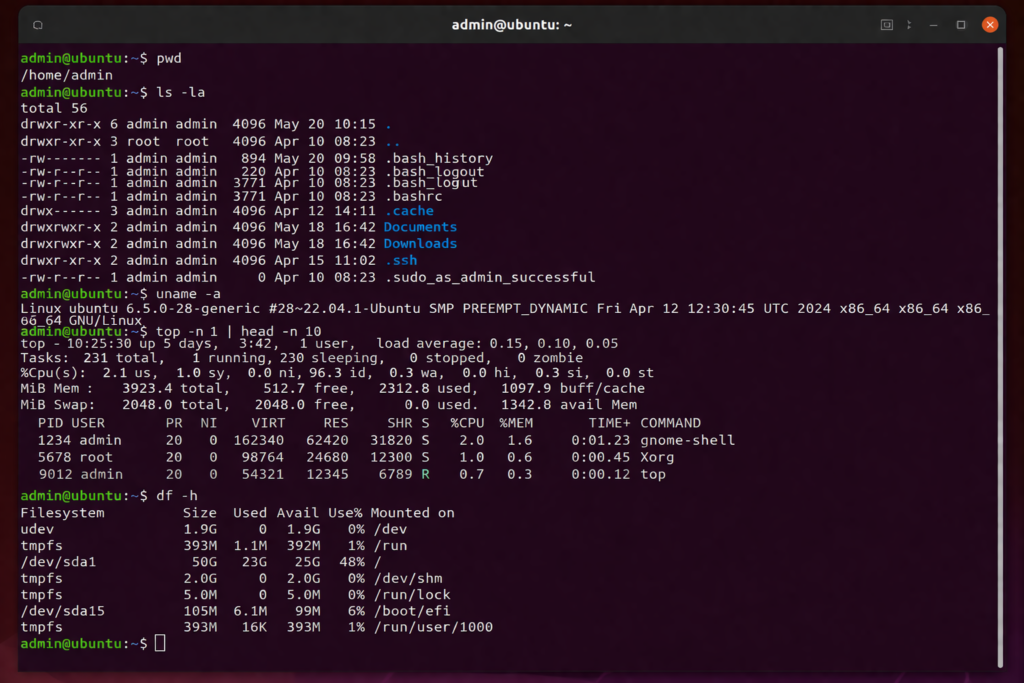
This Linux commands list includes the most useful commands for everyday use.
File & Directory Management
pwd
Prints the current working directory.
pwdls
Lists directory contents.
ls
ls -la
cd
Changes directory.
cd /var/www
cd ..
mkdir
Creates a new directory.
mkdir new-folder
rm
Removes files or directories.
rm file.txt
rm -rf folder/
File Operations
touch
Creates an empty file.
touch file.txtcp
Copies files.
cp file.txt backup.txtmv
Moves or renames files.
mv file.txt new.txtViewing Files
cat
Displays file content.
cat file.txtless
View large files interactively.
less file.txttail
Shows last lines.
tail -f /var/log/syslogSearch & Text Processing
grep
Search for patterns.
grep "error" log.txtfind
Locate files.
find / -name "*.conf"awk
Text processing tool.
awk '{print $1}' file.txtsed
Stream editor.
sed 's/old/new/g' file.txtSystem Monitoring
top
Real-time processes.
tophtop
Enhanced process viewer.
htopuptime
System uptime and load.
uptimefree
Memory usage.
free -hNetworking
ip
Shows network interfaces.
ip aping
Test connectivity.
ping google.comss
Modern replacement for netstat.
ss -tulncurl
HTTP requests.
curl https://example.comNETWORK (ADVANCED)
wget
Download files.
wget https://example.com/file.zipdig
DNS lookup.
dig google.comhost
DNS query.
host google.comtraceroute
Trace network route.
traceroute google.comnc (netcat)
Network tool.
nc -zv localhost 80Package Management (Debian/Ubuntu)
apt update
Updates package list.
sudo apt updateapt upgrade
Upgrades packages.
sudo apt upgradeapt install
Installs package.
sudo apt install nginxPermissions & Users
chmod
Change permissions.
chmod 755 script.shchown
User identity.
chown user:user file.txtid
Prints the current working directory.
idDisk & Storage
df
Disk usage.
du -sh folder/du
Directory size.
pwdlsblk
Block devices.
lsblkAdvanced Linux commands list
tar
Archive files.
tar -czf archive.tar.gz folder/scp
Secure copy.
scp file.txt user@server:/home/ssh
Remote login.
ssh user@serverSystem Information Commands
uptime
Shows how long the system has been running.
uptimeuname
Displays system information.
uname -ahostname
Shows or sets system hostname.
hostnamewho
Shows logged-in users.
whow
Displays active users and processes.
wdate
Shows current date and time.
datecal
Displays a calendar.
calenv
Shows environment variables.
envexport
Sets environment variable.
export VAR=valueecho
Prints text or variables.
echo "Hello"sleep
Pauses execution.
sleep 5reboot
Restarts the system.
sudo rebootshutdown
Shuts down system.
sudo shutdown nowclear
Clears terminal.
clearhistory
Shows command history.
historyalias
Creates command shortcut.
alias ll='ls -la'unalias
Removes alias.
unalias lltime
Measures command execution time.
time lswatch
Runs command repeatedly.
watch -n 1 dateyes
Outputs text repeatedly.
yesUser & Permissions Management
useradd
Creates a new user.
sudo useradd usernameusermod
Modifies a user account.
sudo usermod -aG sudo usernamepasswd
Changes user password.
passwdsu
Switch user.
su usernamesudo
Run command as root.
sudo apt updategroups
Shows user groups.
groupsPERMISSIONS
chmod +x
Makes file executable.
chmod +x script.shumask
Sets default permissions.
umask 022PACKAGE MANAGEMENT (ADVANCED)
apt-cache
Search package info.
apt-cache search nginxdpkg
Install .deb package.
sudo dpkg -i package.debdpkg -l
List installed packages.
dpkg -ladd-apt-repository
Adds repository.
sudo add-apt-repository ppa:example/ppaDISK & FILESYSTEM
mount
Mount filesystem.
mount /dev/sdb1 /mntumount
Unmount filesystem.
umount /mntfdisk
Partition disk.
sudo fdisk -lmkfs
Create filesystem.
mkfs.ext4 /dev/sdb1blkid
Show disk UUID.
blkidPROCESS MANAGEMENT
killall
Kill process by name.
killall nginxnice
Run process with priority.
nice -n 10 commandrenice
Change process priority.
renice 10 -p 1234jobs
List background jobs.
jobsbg
Resume job in background.
bg %1fg
Bring job to foreground.
fg %1ARCHIVE & COMPRESSION
zip
Compress files.
zip archive.zip file.txtunzip
Extract zip.
unzip archive.zipgzip
Compress file.
gzip file.txtgunzip
Decompress file.
gunzip file.txt.gzSYSTEMD Linux commands list
systemctl start
Start service.
sudo systemctl start nginxsystemctl stop
Stop service.
sudo systemctl stop nginxsystemctl restart
Restart service.
sudo systemctl restart nginxsystemctl status
Check service status.
systemctl status nginxsystemctl enable
Enable service on boot.
sudo systemctl enable nginxLOGS Linux commands list
journalctl
View logs.
journalctljournalctl -xe
Detailed logs.
journalctl -xeAdvanced Linux & Power User Commands
xargs
Builds argument list from input.
xargstee
Outputs to file and stdout.
echo "test" | tee file.txtwatch df
Monitor disk usage in real time.
watch df -hwatch free
Monitor memory usage.
watch free -hlsof
Lists open files.
lsofstrace
Trace system calls.
strace lsdmesg
Shows kernel messages.
dmesglsusb
List USB devices.
lsusblspci
List PCI devices.
lspciuptime -p
Pretty uptime format.
uptime -phostnamectl
Manage hostname.
hostnamectltimedatectl
Manage system time.
timedatectlhwinfo
Hardware info.
hwinfofree -m
Memory in MB.
free -mvmstat
System performance.
vmstatiostat
CPU and disk stats.
iostatmpstat
CPU usage per core.
mpstatsar
System activity report.
sarlast
Login history.
lastlastlog
Last login per user.
lastlogFILE & TEXT (ADVANCED)
cut
Extract columns.
cut -d ':' -f1 /etc/passwdsort
Sort lines.
sort file.txtuniq
Remove duplicates.
uniq file.txtwc
Word/line count.
wc -l file.txtpaste
Merge lines.
paste file1 file2join
Join files.
join file1 file2tr
Translate characters.
tr 'a-z' 'A-Z' < file.txtsplit
Split file.
split file.txtSECURITY Linux commands list
chattr
Change file attributes.
chattr +i file.txtlsattr
View file attributes.
lsattrpasswd -l
Lock user.
passwd -l usernamepasswd -u
Unlock user.
passwd -u usernameNETWORK (EXTRA)
ss -s
Socket summary.
ss -scurl -I
Fetch headers.
curl -I https://example.comping -c 4
Ping limited times.
ping -c 4 google.comSYSTEM CONTROL
poweroff
Shutdown system.
sudo poweroffexit
Exit shell.
exitlogout
Logout user.
logoutThis Linux commands list is useful for both beginners and advanced users.
You can learn more about Linux commands in the official documentation.
[…] If you want to learn more, check out our full Linux commands list. […]